once upon a time…
First of all – I have had ZERO, no, less than zero interest in www.pinterest.com since hearing about it. I think the problem was – the way I was seeing it in use had me thinking it was not at all what it really was. It sounded like some kind of time/soul sucking home decor nightmare I wanted nothing to do with. Lots of weird, hipster, modern, and not for me stuff is what I was thinking.
a few weeks ago…
I’ve been majorly frustrated with my inspiration journals. I don’t want to print every cute idea I see on-line – and even if I did most often imgs are too tiny to really print well so the idea is lost. OR I put into my “favorites” folder and then I can’t remember why I’ve got links/where they are. I’ve been posting a lot of inspiration on my BPC on-line class message boards and it’s been frustrating to me that I have to go through so much to save the inspiration I want to use in future/share at some future date…
Then a friend mentioned pinterest. I snarled. gagged. Told her what I really thought.
Then she explained it better than I’ve ever had it explained! Think of it as an inspiration journal, a file-folder filled with the things you want to remember. Recipes, party ideas, crafting ideas, tutorials, household stuff, fashion, things you want to buy when you’ve got the budget… ANYTHING you want to be able to pull up in a flash. A place to save favorite blog posts and ideas that would otherwise get lost.
ok, so I don’t have to look at drift wood carvings or diapers made from hemp? oh…..
I signed up. Um, but apparently you can’t just sign up, and it took a week (maybe 2?) before I got an email saying “ok, you can be a member now”.
7am PST today…
You have to use facebook or twitter to sign up (which basically pulls your profile photo + suggests people you know) – that’s ok I guess. Then you’re off. You can make “pin boards” and name them whatever you like. Make their contents as vague or specific as you want.

You can keep editing/adding/changing. I love that. I also love that you can make notations when you pin something. Sorta like sticking a post-it or drawing an arrow & adding a note when you’re working with an inspiration journal.
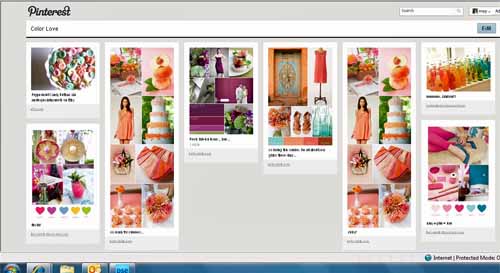
above you see the start of my “color” board.
You can also choose to follow people’s boards which basically means on the home page you’ll see when/what they add. You could follow ALL their boards – or just some. I’m finding most of the time I only want to follow some because of the way/focus I’m planning on using this.

(above are some of Stephanie Howell’s boards that I’m following)
Here’s my home page right now…

When you go to the home page – you’ll see a live-feed of what YOU and the people you’re following are adding and loving… you can “re-pin” onto your own board(s), choose to ‘love’ something, or leave a comment. Here you see me re-pinning something I found on the JBS (Jenni Bowlin) page…

But you could also IGNORE that entirely and just be an island. do/add your own things and look at nothing else. Truly use it as an inspiration file folder…

That’s what really got me – the fabulous blogs I read? Websites I surf? All you do is add the “pin it” button to your favorites and then you can pin anything. anywhere. anytime. A window will pop up where you leave your note, select a board you’re putting it on, and click pin.
Recipes. Books. Color. Party ideas. holidays. fashion. shopping wish-list. photography inspiration. tutorials. DIY. crafty goodness. Seriously – SO MUCH I get inspired by and want to save – and now it’s easy and instant.
So easy. so sweet. AND it’s going to save me crazy amounts of time. I spend SO MUCH TIME searching for “that thing I saw that one time a year or two ago…” and when uninspired I think it’ll be a great place to refresh and renew my creative self.
So now I ask – are you on pinterest? How do you use it? Who are your favorites to follow? Link me up so I can check you out too! Not on there but have questions? Ask away!
you can find me here: http://pinterest.com/mayflaum